把 CSV / TSV / XLSX / JSON 变成可直接投稿、答辩与汇报的动态图表和文档。60 种图表、8 种产物、6 套出版规格——全部在本机完成。 Turn CSV / TSV / XLSX / JSON into publication-ready animated charts and documents. 60 chart types, 8 output formats, 6 publication presets — all rendered on your machine.
读取、清洗、统计、渲染、导出,全在当前设备完成。没有云端排队,没有账号,没有遥测。Parsing, cleaning, statistics, rendering and export all happen on-device. No cloud queue, no account, no telemetry.
环境监测、医疗、政务数据常有硬性要求。整条链路本地执行,只有你主动提供数据直链时才会联网取数,并记录来源与哈希。Monitoring, medical and government data often can't leave the machine. The whole pipeline runs locally; the only network fetch is a data URL you explicitly provide, logged with source and hash.
同一份规格 + 数据哈希 + 渲染命令,产出逐字节一致的结果。每次渲染都写入 manifest,可双机比对、可归档、可交给合作者复现。The same spec, data hash and command yield byte-identical output. Every render writes a manifest — compare across machines, archive it, hand it to a collaborator.
装机完成后,从数据到成稿整条链路离线可用,不依赖任何云端服务,也不会因为服务端升级而悄悄改变出图结果。After setup, the entire data-to-deliverable pipeline works offline. No cloud service, and no silent server-side upgrade quietly changing your figures.
不是又一个网页图表库,而是把科研出图真正需要的表达、规格与复现,做进了同一条命令行链路。Not another web chart library — the expression, specs and reproducibility that research figures actually need, wired into one CLI pipeline.
排名、趋势、占比、流向、分布、层级、极坐标、地图、文本——每种都带 demo 数据、配色与风格预设。Ranking, trend, composition, flow, distribution, hierarchy, polar, maps, text — each with demo data, palettes and style presets.
SVG、PNG、GIF、MP4、PDF、PPTX、DOCX,外加可归档的复现包 bundle——一次渲染任意组合。SVG, PNG, GIF, MP4, PDF, PPTX, DOCX, plus an archival bundle — combine any of them in one render.
4K / 2K / 1080p / 720p 只改变像素密度,不动排版、字号、线宽与留白——切换档位无需重排。4K / 2K / 1080p / 720p change pixel density only — never layout, type, line weight or margins. Switch without re-laying out.
入场错峰 + 时间轴推进,按进度分帧;GIF、MP4、关键帧横排共用同一帧序列,动效与静帧永远一致。Staggered entrances plus timeline progression, framed by progress. GIF, MP4 and storyboards share one frame sequence — motion and stills always agree.
先决定“要说明什么关系”,再选图。每种图表都附带 demo 数据与配色,可先验证效果再替换为自有数据。Decide what relationship you want to show, then pick a chart. Every type ships with demo data and palettes — validate the look, then swap in your data.
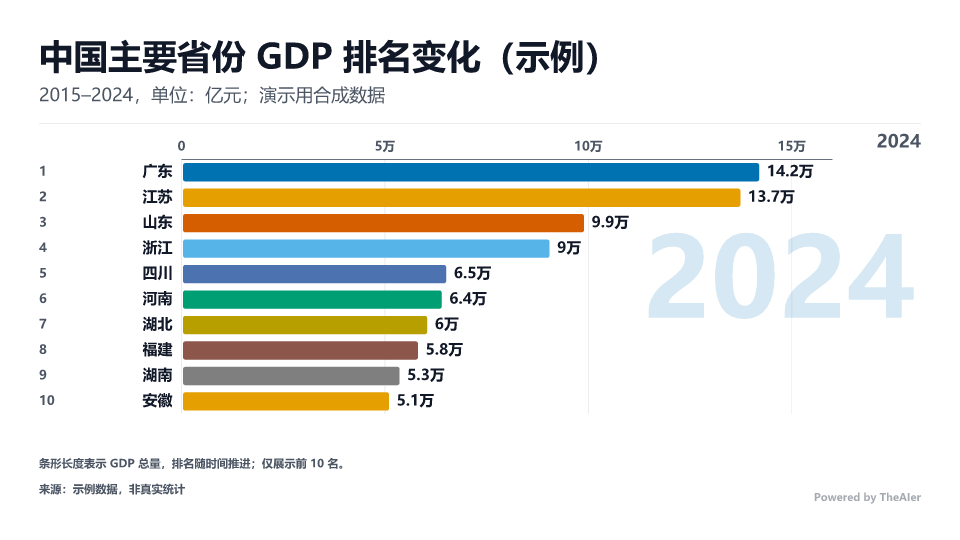
动态排名条形图、条形图、柱状图、对比条形、折线排名、棒棒糖、子弹、瀑布、评分环、液面图Bar race, bar, column, comparison bar, line ranking, lollipop, bullet, waterfall, score ring, liquid fill
动态折线、双轴折线、堆叠面积、河流图、K 线、时间线(横/竖)、甘特图Animated line, dual-axis line, stacked area, streamgraph, candlestick, timeline (h/v), Gantt
饼图、环形、玫瑰图 6 变体、堆叠柱、漏斗、矩形树图、圆堆、旭日、极坐标柱、沃罗诺伊Pie, donut, 6 rose variants, stacked column, funnel, treemap, circle packing, sunburst, polar bar, Voronoi
气泡图、散点图、桑基图、弦图、平行坐标、维恩图、力导向图Bubble, scatter, Sankey, chord, parallel coordinates, Venn, force graph
斜率图、蝴蝶图、人口金字塔、哑铃图、发散条形Slope, butterfly, population pyramid, dumbbell, diverging bar
折线柱组合图,双轴刻度严格对齐、网格不错位Combo line + column with strictly aligned dual axes and no grid drift
直方图、箱型图、热力矩阵Histogram, box plot, heatmap matrix
树状图,间距按实测标签宽度反算,避免文字交叠Tree diagram with spacing derived from measured label widths to avoid collisions
雷达图、极坐标折线、径向折线、径向柱(玉珏)Radar, polar line, radial line, radial bar
热力地图、气泡地图、流向地图,均含全国 / 分省版Heat, bubble and flow maps, in national and provincial variants
词云,字号与布局按词频与实测宽度排布Word cloud with size and layout driven by frequency and measured widths
打开画廊,按族筛选、点击放大看细节。Open the gallery to filter by family and zoom in.
进入画廊Open gallery误差与显著性、期刊尺寸、色盲友好、灰度打印——不必再导出到别的软件里补画。Uncertainty and significance, journal sizes, color-vision safety and grayscale printing — without exporting to another tool to patch them in.
--grayscale 灰度输出Accessibility: color-vision simulation, grayscale separability, WCAG contrast; --grayscale output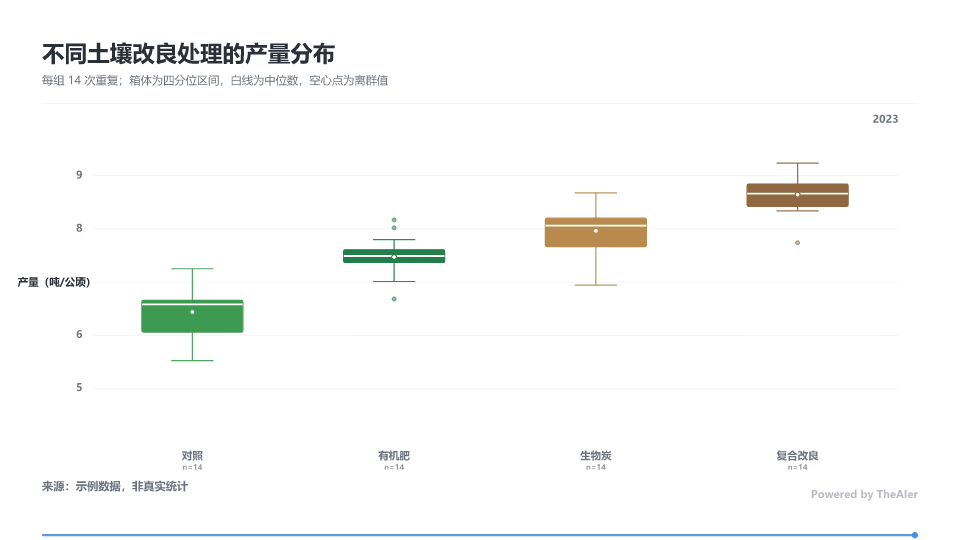
示例 · 箱型图:四分位区间、离群值与样本量 nExample · box plot: quartile ranges, outliers and sample size n
术语、单位、精度、阈值、推荐图组、可直接渲染的典型规格,以及该领域常见审稿意见——一条命令套用。Terminology, units, precision, thresholds, recommended chart sets, ready-to-render specs and common reviewer comments — applied with one command.
颗粒物源解析、空气质量、达标评价PM source apportionment, air quality, compliance
查看样例图View samples→发病率、监测、干预效果Incidence, surveillance, intervention effects
查看样例图View samples→增速、结构、区域对比Growth, structure, regional comparison
查看样例图View samples→能耗、排放、结构转型Consumption, emissions, transition
查看样例图View samples→招生、就业、学科评估Admissions, employment, evaluation
查看样例图View samples→套用示例:Example: motionchart init --domain eco --chart heatmap --data x.csv
三个入口,从“这堆数据该画什么”到“图已经出好了”。Three entry points, from "what should I even chart?" to "the figure is done".
trymotionchart try 数据.csv 识别列类型与时间字段,推荐 Top 3 图表,直接出并排对比图与三份可渲染 spec。motionchart try data.csv detects column types and time fields, recommends top 3 charts, renders a side-by-side comparison and three ready specs.
wizardmotionchart wizard 一步步问出意图,每步回车即走默认值——不必记任何参数。motionchart wizard walks through intent step by step; press Enter to accept defaults — no parameters to memorise.
gallerymotionchart gallery 生成按族分组的动态预览、选图决策树与能力对比表,本地打开即用。motionchart gallery builds a family-grouped preview with a decision tree and capability table — open it locally.
把“本地优先”做成可检查的事实:环境清单、体检报告、产物 manifest,逐项都能核对。"Local-first" is made checkable: environment inventory, health report and per-render manifest — all verifiable line by line.
# 环境清单(含工具目录位置)
motionchart doctor

# 六项体检报告(机器可读)
motionchart onboard --check --json单元 × 属性 × 视觉回归 × 端到端 × 性能 × CLI 契约 × 跨平台 CI;覆盖率门禁写入配置,低于阈值构建即失败。Unit × property × visual regression × e2e × performance × CLI contract × cross-platform CI; coverage gates fail the build below threshold.
需要 Node.js ≥ 20 与一款中文字体。安装约一分钟,只装一次;之后每次画图都不用再装。Requires Node.js ≥ 20 and a CJK font. Install takes about a minute, once — after that, every chart needs nothing more.
# 1 · 安装(约 1 分钟,只装一次 / install once)
npm install -g motionchart-cli --registry https://registry.npmmirror.com

# 2 · 六项体检 → 选目录 → 验证图 / onboard
motionchart onboard

# 3 · 查看效果,替换为自有数据 / render demo
motionchart demo --formats png --open免全局安装:npx -y motionchart-cli doctorNo global install: npx -y motionchart-cli doctor
画廊按 11 个族分组,点击任意图表放大查看细节;全部由本项目用合成数据本地渲染。The gallery groups all 60 by family — click any chart to zoom in. Every one rendered locally from synthetic data.
本地渲染、规格驱动、逐字节可复现——从论文配图到答辩演示,一条命令走完。Local rendering, spec-driven, byte-reproducible — from paper figures to defence decks, in one command.